How to Retrofit a Fixed Industrial Camera with a Pan-Tilt Unit
Can you add remote pan and tilt movement to a camera you already own? Often, yes—but only if the camera, bracket, pan-tilt unit (PTU), cables and controller work as one system. A motorized pan tilt camera mount changes where the camera points. It does not upgrade the sensor, add optical zoom or automatically make the existing VMS control the mount. Before buying hardware, check the following six items.
Decide Whether the Camera Should Move
A retrofit makes sense when the existing image quality is adequate but operators need to inspect several directions. It is a poor substitute for a permanent overview camera: while the PTU looks toward one location, it cannot watch another. Keep fixed coverage for continuous alarms or measurements, and add a moving unit when necessary. Replace the camera itself if the lens or sensor cannot deliver the required detail.
Size the Complete Payload—not Just the Camera
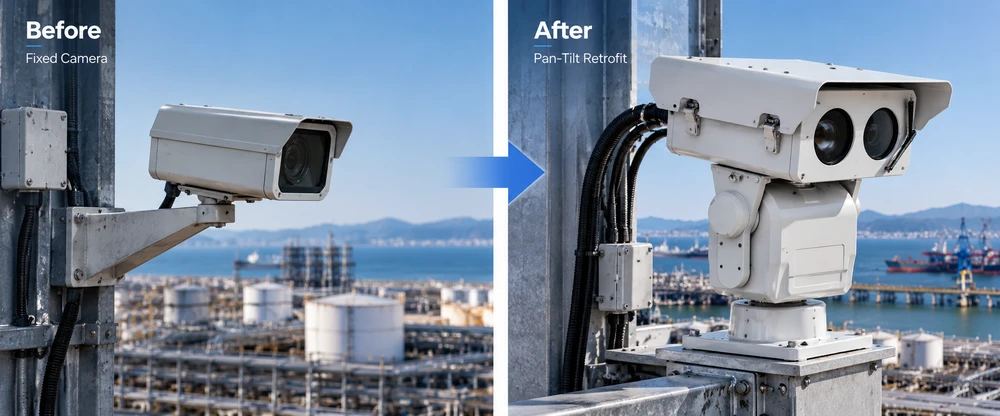
Record the mass of everything that moves: camera, lens, housing, adapter, fasteners and moving cable sections. Also measure the center of gravity (CoG) relative to the tilt axis. A quoted payload capacity in kilograms is not enough to validate the assembly.
As an initial static check, an offset load produces a tilt moment of approximately M = m × 9.81 × e, where m is mass in kg and e is the horizontal CoG offset in meters. For example, a 6kg assembly with a 0.10m offset produces roughly 5.9N·m of gravitational moment at the relevant orientation. This is an illustration, not the required motor torque or a JEC rating; acceleration, inertia, wind and friction must also be reviewed.
Send the supplier the assembly drawing, CoG, desired pan/tilt speeds, acceleration, duty cycle and exposed surface area. Ask them to confirm the selected PTU against the actual load and mounting geometry.
Check Bracket Fit and Movement Clearance
Compare mounting-hole patterns, camera orientation, enclosure restrictions and fastener access. Check the full pan/tilt envelope with the housing and harness fitted—not only the straight-ahead position. The lens must clear the bracket at the required viewpoints, and cables must not pull against connectors or block service access.
Video: JEC Multi-Sensor PTU Overview
For heavy or offset payloads, request an adapter drawing for approval before machining. A successful bench fit does not prove the pole, mast or rooftop support is sufficiently rigid.
Map Video and PTU Control as Separate Paths
The camera sends video; the PTU receives movement commands. These functions may share a network, but compatibility has to be demonstrated. ONVIF video discovery, for example, does not prove that an NVR can control an external PTU.
| System path | Confirm before ordering |
|---|---|
| Video | Camera output, network route, recorder compatibility and video continuity during motion |
| Motion control | Controller, PTU interface (such as Ethernet or serial), protocol and stop command |
| Presets/feedback | Whether position reporting and preset recall are supported by the complete integration |
| Power | Separate camera and PTU supplies, peak demand, voltage drop and protection |
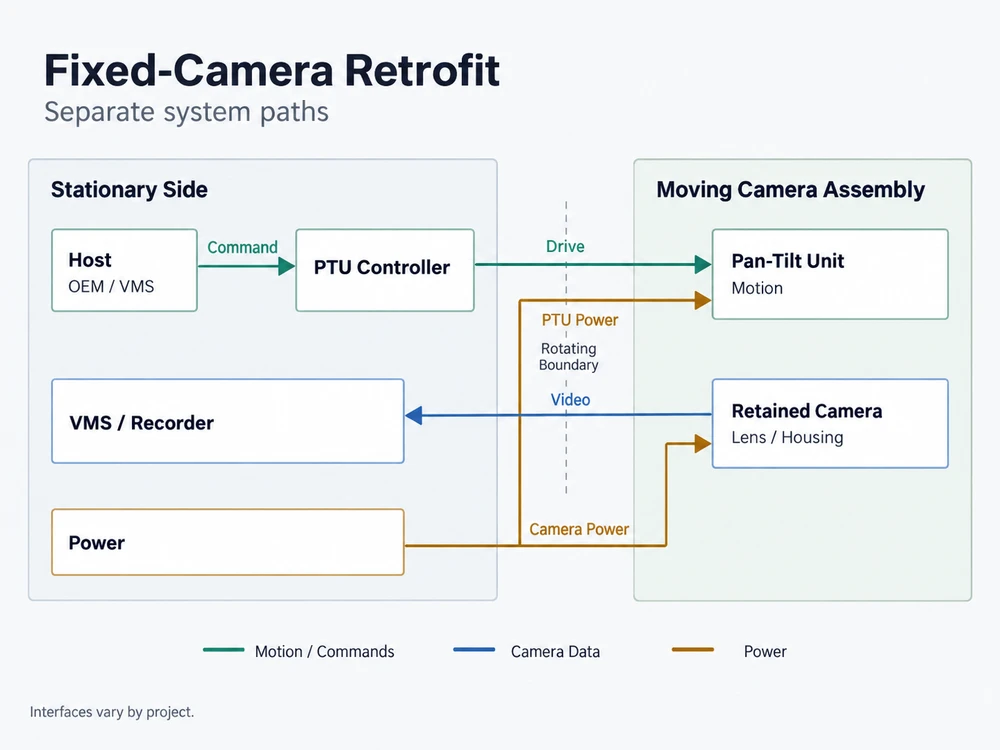
Ask the integrator to demonstrate pan, tilt, stop and any required presets from the actual operator screen. If a gateway or custom driver is needed, specify who develops and maintains it. The PTU Ethernet and payload power checklist provides additional interface questions.
Specify Rotation and Cable Routing Together
For limited pan travel, define software or mechanical limits and give the harness enough slack and strain relief throughout the movement envelope. Check minimum bend radius and repeated flexing.
For continuous rotation, request a documented rotary interface or slip-ring configuration. Check the number of circuits, current ratings and supported data channels against the camera’s real connections. A mount capable of continuous 360° movement does not necessarily pass Ethernet, PoE, video or auxiliary signals through the rotating joint. Do not assume that a slip ring exists or suits the payload unless it is specified.
Outdoor installations also need a review of connector sealing, cable glands, corrosion exposure, lightning/surge protection and grounding as an assembled system—not just the PTU enclosure rating.
Agree Acceptance Tests Before the Prototype
Test the retained camera and its actual lens on the proposed PTU, bracket and harness. Save baseline footage from the fixed installation so the buyer can compare image quality and operational behavior.
| Test | Pass evidence |
|---|---|
| Travel and clearance | Full approved movement without collision or cable strain |
| Control and stop | Commands work from the intended VMS or controller; stop behavior recorded |
| Target views | Required scenes visible after movement; captures saved |
| Presets and stability | Repeatability and settling behavior meet agreed project limits |
| Continuity and recovery | Video and controls recover as specified after motion or permitted interruptions |
Repeat essential checks on site (SAT), because tower vibration, cable length and network topology can differ from factory acceptance testing (FAT). For radiometric thermal cameras, obtain camera-OEM approval for any new window, enclosure or moving measurement area; changing the view can change what an alarm region measures.
What to Include in Your Retrofit RFQ
- Camera: make/model, lens, firmware, video output and any thermal measurement functions.
- Assembly: moving mass, CoG, drawings, mounting pattern and housing dimensions.
- Motion: pan/tilt angles, speed, duty cycle, preset requirements and continuous-rotation needs.
- Interfaces: control host/VMS, protocols, power supplies and every cable crossing a moving axis.
- Site: mounting structure, wind/weather exposure, quantities and FAT/SAT criteria.
Use these details to shortlist options from the JEC pan-tilt unit range. A product’s nominal payload class should start the discussion, not end the compatibility review.
Frequently Asked Questions
Can a fixed camera become a full PTZ camera?
A suitable mount adds pan and tilt. Zoom, tracking, video and presets work only if the camera and controller support them in the finished system.
Can my existing NVR control the PTU?
Only if a tested control route exists. Confirm the specific NVR, driver, protocol and firmware; video streaming alone is insufficient evidence.
Can I retrofit a thermal camera?
Yes, subject to mechanical and interface checks. Radiometric models also need validation of measurement regions, optical windows and alarms after movement.
Make the Retrofit Decision with Evidence
Retrofitting can preserve a useful industrial camera, but the purchase decision should rest on drawings, interface compatibility and a repeatable prototype test—not a mounting weight alone. Send JEC your camera retrofit RFQ for a project-based PTU configuration review.